

The Hidden Magic of Video Delivery
You upload a video file. Your viewer watches it on their phone during a commute, on their laptop at home, or on their smart TV in the living room. The video looks great on each device, loads quickly, and doesn’t buffer.
How does that happen? Video transcoding.
What is Transcoding?
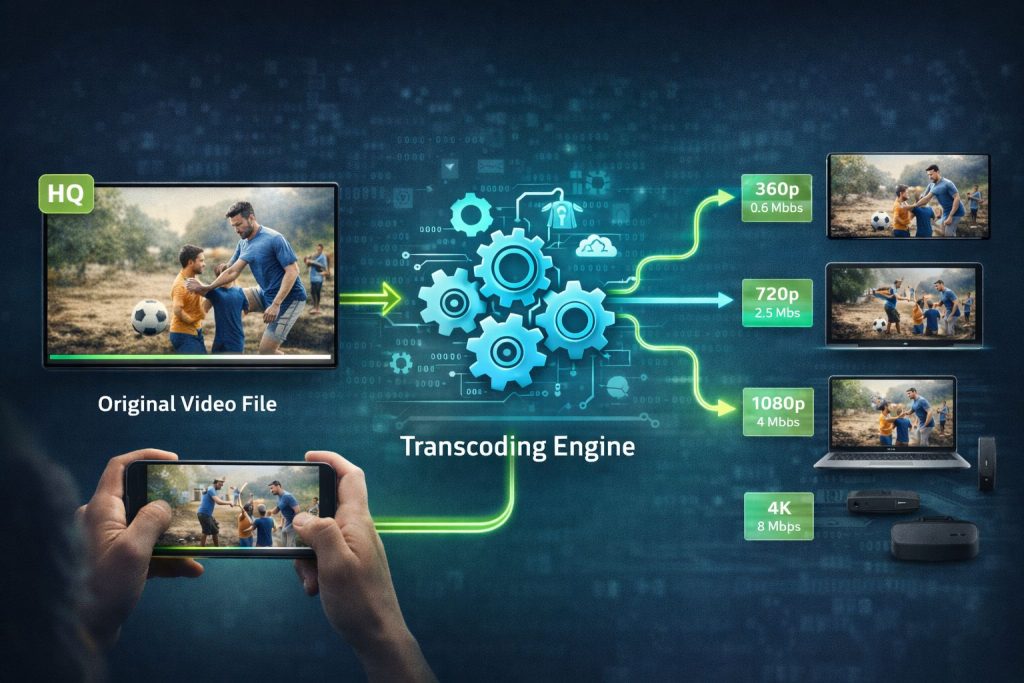
Transcoding is the process of converting a video file from one format to another. When you upload a video to Bamboo Cloud, our systems automatically create multiple versions optimized for different scenarios:
- Different resolutions – 1080p, 720p, 480p, 360p
- Different bitrates – Higher quality for fast connections, lower for slow
- Different codecs – Formats compatible with various devices and browsers
Why Transcoding Matters
Device Compatibility
The video format that works on an iPhone might not work on a Roku. The codec supported by Chrome might fail on Safari. Transcoding creates versions that work everywhere:
- iOS and Android mobile devices
- Desktop browsers (Chrome, Firefox, Safari, Edge)
- Smart TVs and streaming devices
- Gaming consoles
Adaptive Bitrate Streaming
Your viewers have different internet connections. Transcoding enables adaptive bitrate streaming (ABR):
- Fast connection? Enjoy 1080p HD
- Slow WiFi? Automatically drops to 480p
- Connection improves? Quality increases in real-time
- Result: No buffering, continuous playback
Faster Start Times
Multiple quality levels mean videos start playing almost instantly:
- Player starts with a lower quality for immediate playback
- Quality increases as more data downloads
- Viewers see content immediately instead of waiting
Resolution and Quality Levels
Bamboo Cloud typically creates these renditions:
| Resolution | Common Name | Best For |
|---|---|---|
| 1920×1080 | Full HD (1080p) | TVs, large monitors, fast connections |
| 1280×720 | HD (720p) | Laptops, tablets, good connections |
| 854×480 | SD (480p) | Mobile, moderate connections |
| 640×360 | Low (360p) | Slow connections, data saving |
Codecs and Formats
H.264 (AVC)
The most widely compatible codec:
- Plays on virtually every device
- Good quality at reasonable file sizes
- Industry standard for years
H.265 (HEVC)
Next-generation compression:
- 50% smaller files at same quality
- Better for 4K content
- Growing device support
VP9 and AV1
Open-source alternatives:
- No licensing fees
- Excellent compression
- Strong browser support
Upload Best Practices
Better source files produce better transcoded output:
Resolution
Upload at the highest resolution you have. You can always transcode down, but you can’t add quality that wasn’t there.
Bitrate
Higher bitrate source files give transcoding more data to work with, resulting in better output quality.
Format
Common upload formats include:
- MP4 (H.264) – Most common, widely compatible
- MOV – Common from Apple devices and professional cameras
- MKV – Flexible container format
Frame Rate
Match your content type:
- 24fps – Cinematic content
- 30fps – Standard video
- 60fps – Sports, gaming, fast motion
Transcoding Speed
How long does transcoding take? It depends on:
- Source file length and resolution
- Number of output renditions
- Platform processing capacity
Bamboo Cloud uses distributed cloud processing to transcode videos quickly—typically faster than real-time for most content.
Quality Without the Complexity
With Bamboo Cloud, transcoding happens automatically. Upload your video, and our systems handle the rest—creating optimized versions for every device and connection speed your viewers might have.
Experience seamless video delivery with Bamboo Cloud