

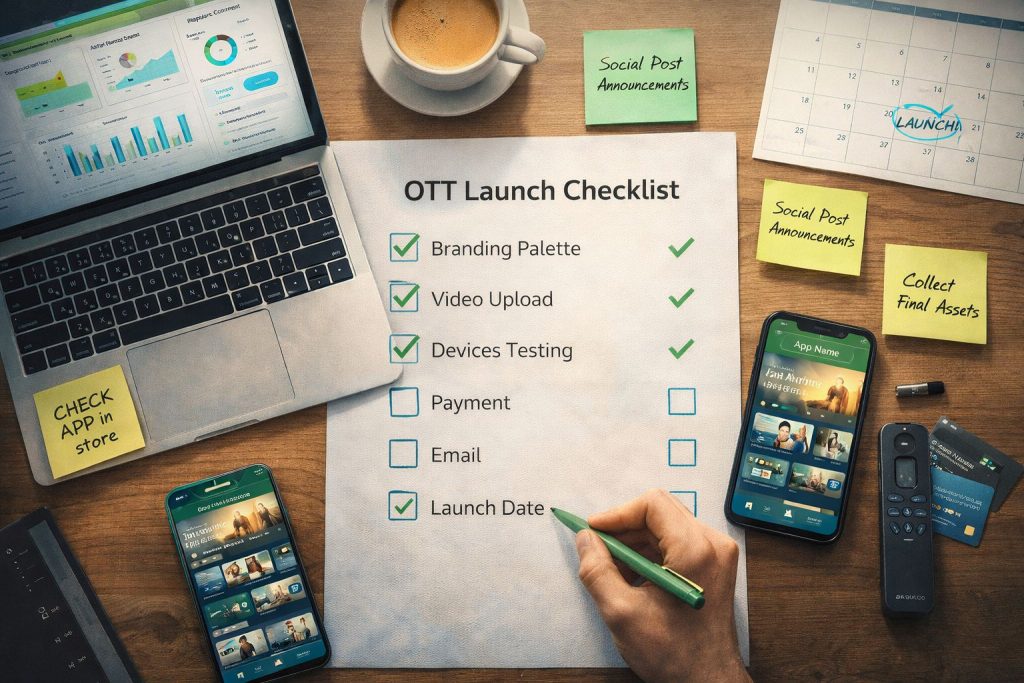
Don’t Launch Without Checking Every Box
Launching your OTT platform is exciting—but rushing to go live without proper preparation can lead to embarrassing bugs, frustrated viewers, and lost subscribers. This checklist ensures you’re truly ready.
✅ Branding & Design
☐ Logo uploaded in required formats and sizes
☐ Brand colors configured across all platforms
☐ Custom domain set up and SSL configured
☐ Favicon and app icons designed
☐ Homepage hero banner created
☐ About page or section completed
☐ Terms of Service and Privacy Policy published
✅ Content Library
☐ Minimum viable content library uploaded (at least 20-50 videos)
☐ All videos have titles, descriptions, and metadata
☐ Custom thumbnails created for each video
☐ Content organized into categories and subcategories
☐ At least one featured/hero video or series designated
☐ Playlists created for guided viewing paths
☐ Content publishing schedule planned for next 30 days
☐ Free vs. premium content clearly designated
✅ Video Quality
☐ All videos transcoded successfully
☐ Playback tested on mobile (iOS and Android)
☐ Playback tested on desktop (Chrome, Safari, Firefox)
☐ Playback tested on TV apps (if applicable)
☐ Audio quality verified across content
☐ Subtitles/captions added where needed
✅ Monetization
☐ Pricing strategy finalized (SVOD, TVOD, free, hybrid)
☐ Subscription tiers created with clear value propositions
☐ Payment processor connected and tested
☐ Test purchase completed successfully
☐ Free trial period configured (if offering)
☐ Refund/cancellation policy written
✅ User Experience
☐ Registration flow tested end-to-end
☐ Login/logout working correctly
☐ Password reset functioning
☐ Search functionality working
☐ Navigation intuitive and logical
☐ Video player customized with branding
☐ Mobile responsiveness verified
☐ Page load speeds acceptable
✅ Apps (If Launching with Apps)
☐ iOS app submitted to Apple App Store
☐ Android app submitted to Google Play Store
☐ TV apps submitted (Roku, Fire TV, Apple TV, Samsung, LG, Xbox)
☐ App store listings optimized (screenshots, descriptions)
☐ App review timelines factored into launch date
☐ All apps tested on actual devices
✅ Email & Communication
☐ Welcome email configured for new subscribers
☐ Subscription confirmation email set up
☐ Password reset email configured
☐ Launch announcement email drafted
☐ Email list segmented for launch communication
☐ Push notification system configured
✅ Marketing & Launch
☐ Launch date selected and communicated to team
☐ Social media launch posts created (LinkedIn, FB, Instagram)
☐ Blog announcement post written
☐ Launch email sequence scheduled
☐ Referral program set up (if applicable)
☐ Influencer/partner outreach completed
☐ Press release or announcement prepared
✅ Analytics & Tracking
☐ Analytics dashboard reviewed and understood
☐ Key metrics identified (views, watch time, subscribers, revenue)
☐ Conversion tracking set up
☐ Baseline metrics documented
✅ Support & Operations
☐ Support contact method established (email, chat)
☐ FAQ or help section created
☐ Team roles for post-launch defined
☐ Content update workflow documented
☐ Backup plan for technical issues on launch day
✅ Launch Day
☐ Final platform review completed
☐ Team briefed on launch day responsibilities
☐ Monitoring dashboard open for real-time tracking
☐ Launch announcement sent (email + social)
☐ Team available for rapid issue resolution
☐ Celebrate! 🎉
Post-Launch (First 7 Days)
☐ Monitor analytics daily
☐ Respond to user feedback immediately
☐ Fix any bugs or issues promptly
☐ Publish fresh content on schedule
☐ Send follow-up engagement emails
☐ Document lessons learned
Launch with Confidence
Bamboo Cloud’s guided setup process covers most of these items automatically. But having this checklist ensures nothing slips through the cracks.
Start your OTT launch with Bamboo Cloud