

The Sports Training Video Library Every Program Should Have
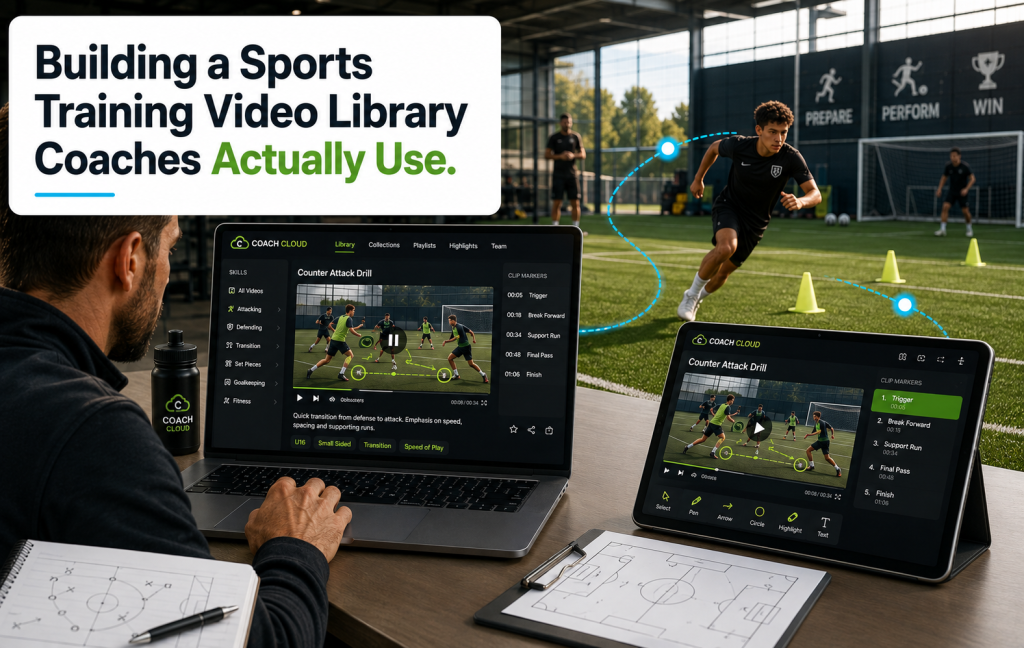
A sports training video library is one of the most quietly transformative tools a coach, academy, or team can build. Every practice is a chance to teach; every game is a chance to review; every drill is a chance to reinforce. But the video that captures all of that usually ends up scattered across coaches’ phones, unlabeled cloud folders, and forgotten hard drives. A proper sports training video library takes that scattered footage and turns it into a searchable, organized resource that gets used every week.
Here’s how to build one that actually gets used.
Who Needs a Sports Training Video Library
The audience is broader than most people think:
- Coaches — for practice planning, film review, and player development
- Athletes — for self-study and technique refinement
- Sports academies — for consistent teaching across multiple coaches
- Youth leagues — for skill progression across age groups
- Individual trainers — for delivering programs to remote clients
- Parents — for supporting their kids’ development between sessions
Structure the Library Around How Coaches Think
The single biggest reason a sports training video library goes unused is bad organization. Coaches don’t search for “video_march_15.mp4” — they search for “shooting drills” or “left-foot passing” or “defensive footwork.” Structure by:
- Skill category (shooting, passing, defending, conditioning, mental)
- Position or role (goalkeeper drills, midfield distribution, forward finishing)
- Age or level (U8, U12, U16, senior, elite)
- Duration (2-minute drill breakdown vs 20-minute session vs full 90-minute game)
- Format (drill demonstration, technique breakdown, game footage, tactics whiteboard)
- Season phase (pre-season, in-season, playoffs, off-season)
Tag every video with three or four categories so coaches find it multiple ways.
What Content Belongs in a Sports Training Video Library
Different clients need different content mixes. The strongest sports training video libraries include:
Drill Library
Short, focused videos (2–5 minutes) demonstrating a specific drill with setup, coaching points, and progressions. This is the workhorse content that coaches use week after week.
Technique Breakdowns
Longer videos (5–15 minutes) explaining the mechanics of a specific skill — slow motion, angle changes, coaching commentary.
Game Footage and Film Review
Full game recordings, edited highlight reels, and coach-annotated film sessions.
Session Plans
Full practice sessions (30–90 minutes) that a coach can follow or adapt.
Live Sessions and Q&A
Live-streamed coaching workshops with real-time questions from viewers, recorded automatically for the on-demand library.
Access Tiers That Make Sense for Sports
The sports training video library monetization model differs by audience:
| Audience | Access Model | Typical Price |
|---|---|---|
| Individual athlete | Monthly SVOD | $9.99 – $19.99 |
| Individual coach | Monthly SVOD (premium) | $19.99 – $49.99 |
| Team / club license | Per-season or annual, multi-seat | $299 – $2,999 |
| Academy license | Annual site license | $2,000 – $20,000+ |
| Federation / league license | Custom annual contract | Five-figure and up |
Live Sessions Are the Retention Anchor
A sports training video library that’s purely on-demand tends to churn. Adding a weekly live component — a Q&A, a live drill session, a live film review — creates a recurring appointment that anchors subscribers’ habit. Use Bamboo Live for the broadcast and the recording flows automatically into the on-demand library.
Distribute on Every Device Coaches and Athletes Use
Coaches review video on the sideline (phone), during planning (laptop), and on the TV during a team meeting. Athletes watch on phones between sessions and on tablets during travel. A sports training video library needs to reach all of them. Bamboo Cloud’s OTT Apps suite (Business plan) delivers iOS, Android, Roku, Fire TV, Apple TV, and Android TV apps from a single library.
Making the Library Get Used
Structure alone isn’t enough. What works to drive usage:
- Weekly featured content: Highlight 3–5 new drills or breakdowns each week
- Coach playlists: Head coaches build session-specific playlists to share with assistants
- Skill progressions: Structured pathways that guide an athlete from beginner to advanced
- Team-specific folders: Coaches upload team-specific game footage into private folders alongside the library
- Push notifications via OneSignal for new drills, live sessions, and coach announcements
Common Pitfalls
- Uploading raw footage without editing. A 90-minute practice video is unusable. Cut it into drill-specific clips.
- Weak tagging. Untagged videos are invisible to search.
- No progression pathways. Random drills don’t build athletes — structured skill progressions do.
- Ignoring mobile. Coaches use phones on the sideline. If the library isn’t fast on mobile, it’s not used.
- Skipping live. Purely on-demand libraries churn faster than mixed live-plus-on-demand.
Ready to build a sports training video library your program actually uses? Start your free trial today and launch on every device this month.