

The App Store Is Your Front Door
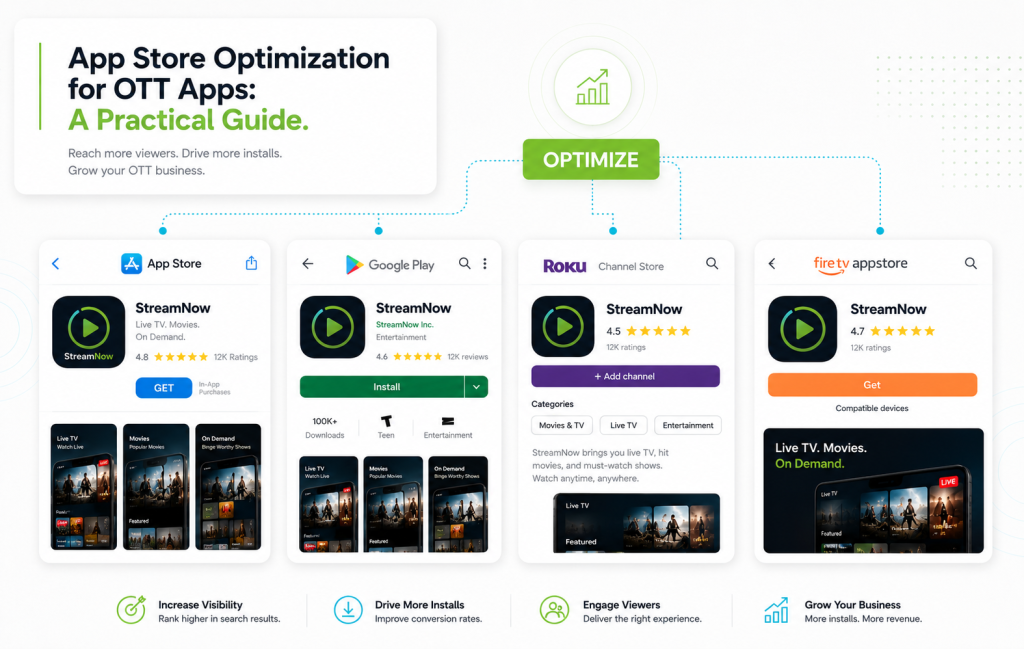
App store optimization for OTT apps is one of the most under-invested areas in streaming. Operators spend months building a beautiful app, then ship a listing with a generic icon, a 40-word description, and three blurry screenshots — and wonder why installs are flat. The reality: most viewers find a streaming app by browsing or searching their device’s store, not by typing in a URL. Your listing is the single biggest install conversion lever you have.
Here’s a practical playbook for app store optimization for OTT in 2026.
1. Pick the Right Primary Keyword
Your app icon, title, and subtitle are indexed for search inside each store. Don’t waste them on your brand name alone — combine the brand with a category keyword that describes what the app does:
- Weak: “FaithStream”
- Strong: “FaithStream: Sermons & Worship”
- Weak: “MoveFit”
- Strong: “MoveFit — Yoga & Strength Classes”
2. Write a Screenshots-First Listing
Most users decide whether to install based on screenshots, not the description. The first three screenshots are the only ones almost anyone sees. Make them count:
- Screenshot 1: The hook — your single most compelling visual + a one-line value prop
- Screenshot 2: The catalog — show breadth of content
- Screenshot 3: The unique feature — live classes, FAST channels, watch-on-TV, downloads
- Screenshots 4–8: Depth — instructors, programs, community, devices
3. Optimize for Each Store Separately
| Store | Where Keywords Live | Critical Asset |
|---|---|---|
| Apple App Store | Title, subtitle, 100-char keyword field | Screenshots and preview video |
| Google Play | Title, short description, long description | Long description (Google indexes it) |
| Roku Channel Store | Title, description, category | Channel preview image + screenshots |
| Fire TV App Store | Title, description, keywords | Hero image and feature graphic |
4. Engineer Ratings From Day One
Apps with 4.5+ stars convert 2–3x better than apps with 3.5 stars. The trick isn’t pushing for reviews from everyone — it’s asking the right users at the right moment.
- Prompt after a clear “happy moment” — finishing a class, completing an episode
- Never prompt after an error, slow load, or payment screen
- Cap prompts to once per user per quarter
- Reply to every 1–3 star review publicly within 48 hours
5. Localize for Your Real Markets
If 20% of your audience is in a non-English market, localize the listing — title, subtitle, screenshots, and description — in that language. App store optimization for OTT is dramatically more competitive in English. A localized listing often outranks the English original in its home market.
6. Test, Don’t Guess
Both Apple and Google support A/B testing of listing creative. Run real tests on:
- Icon variations
- Hero screenshot copy
- Preview video vs no preview video
- Subtitle wording
Even small lifts in install conversion compound massively over a year.
7. Don’t Forget the TV Stores
Roku, Fire TV, Apple TV, and Android TV stores get a fraction of the ASO attention that mobile gets — which is exactly why investing here pays off. Strong listings on the connected-TV stores often dominate the categories because so few operators do the work.
Quick Wins You Can Implement This Week
- Rewrite your subtitle to include a category keyword
- Replace screenshots 1–3 with hook / catalog / unique feature
- Add a 15-second preview video on iOS
- Set up an in-app review prompt at a happy moment
- Reply to every low-star review on every store
Ready to launch OTT apps that actually convert installs? Start your free trial today and ship your branded apps with Bamboo Cloud.