

TThe EPG Embed That Turns Any Website Into a Streaming Destination
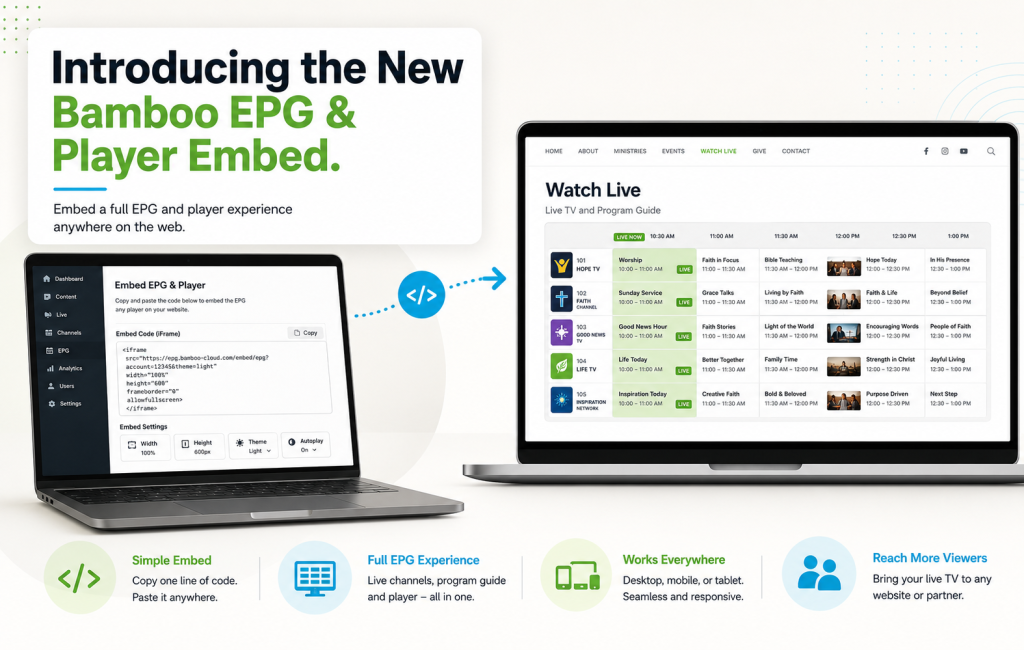
The new Bamboo EPG embed is one of the most requested features we’ve shipped this year. It solves a problem every FAST channel operator hits eventually: how do you put your full electronic program guide and player on a website that isn’t your own Bamboo Site? Before this release, embedding meant custom API integration and a real dev project. Now, it’s a single iframe you can paste anywhere — WordPress, Squarespace, Webflow, a partner’s site, a landing page — and the full EPG experience renders instantly.
Here’s what the new EPG embed does, why it matters, and how to use it.
What the EPG Embed Actually Includes
The embed renders a complete live experience, not just a video window:
- The full player at the top, playing the currently live program
- The channel grid below, showing all your Bamboo Channels with their scheduled programs
- Time-slot navigation — viewers can scroll forward and back through the schedule
- Program details — clicking any program shows title, description, and air time
- Channel switching — viewers can jump between channels without leaving the embed
- Responsive design — the embed adapts to desktop, tablet, and mobile automatically
Everything a viewer expects from a cable-style TV guide, delivered from your Bamboo Channels library.
Where the EPG Embed Changes the Game
Three use cases where the new EPG embed transforms what’s possible:
1. Distribution Partners
When you want a distribution partner or content aggregator to feature your channel lineup on their site, embedding used to mean custom API work on their end. The EPG embed removes that friction entirely — partners paste one iframe and your full channel guide appears.
2. Landing Pages and Marketing Sites
Your Bamboo Site is the home for your streaming platform, but marketing campaigns often need a dedicated landing page with the EPG right on it. The embed lets your marketing team drop the full live experience into any landing page tool without touching Bamboo Cloud directly.
3. Non-Bamboo Sites You Operate
Many operators run multiple websites — a corporate site, a marketing site, a community site — and want to feature their FAST channel programming across all of them. The EPG embed lets you syndicate the same live experience across every property.
How to Get the EPG Embed Code
The workflow is deliberately simple:
- Log in to your Bamboo Cloud dashboard
- Navigate to Platform → Live TV
- Scroll down to the EMBED section
- You’ll see two options: a Preview URL (open it in a browser tab to test how the embed looks) and an iFrame Embed Code (the snippet to paste into your site)
- Copy the iframe code and paste it into any website’s HTML — a WordPress Custom HTML block, a Squarespace embed block, a Webflow embed, or straight into a page template
- The embed renders immediately with your live programming, channel guide, branding, and colors
Total setup time: under two minutes per embed location.
Automatic Branding — Nothing to Configure
The EPG embed automatically inherits your existing Live TV settings — branding, colors, channels, and EPG data all carry over from your Bamboo Cloud dashboard. You don’t configure the embed separately from your Live TV setup. When you update your Live TV, the embed updates too.
The iframe code itself is configurable via standard HTML attributes:
- Width — default is 100% (responsive to container)
- Height — default is 700px, adjust as needed
- Allow attributes — autoplay, fullscreen, and encrypted-media are enabled by default
What About Ad Monetization?
The EPG embed works with your existing Bamboo Channels ad-partner integration. Ad breaks configured through your third-party ad server (FreeWheel, SpringServe, Google Ad Manager, or your SSP) run inside the embedded player exactly as they do on your Bamboo Site. Every embed impression counts toward your ad inventory.
Common Questions
- Does it work on WordPress? Yes — use the Custom HTML block or a plugin like WPCode.
- Does it work on Squarespace, Wix, Webflow, and Framer? Yes — any platform that accepts an iframe embed works.
- Do I need to configure branding separately for the embed? No — the embed uses your existing Live TV settings automatically.
- Do I need to set it up per channel? No — the embed shows your full channel lineup with the EPG.
- Can I test it before embedding? Yes — use the Preview URL from the EMBED section to open the embed in a browser tab first.
What This Enables
The new EPG embed is more than a distribution convenience — it’s an unlock for partnerships, marketing sites, and multi-property operators who want a full live-TV experience anywhere on the web. If your FAST channel strategy depends on reach beyond your primary Bamboo Site, this is the feature you’ve been waiting for.
Ready to embed your channels everywhere? Start your free trial today and grab the embed code from Platform → Live TV in your dashboard.