

Guided Onboarding: Launching a Streaming Platform Without a Manual
Launching a streaming platform used to mean reading documentation. The new Bamboo Cloud Admin Dashboard replaces that with guided onboarding and interactive tours built right into the product.
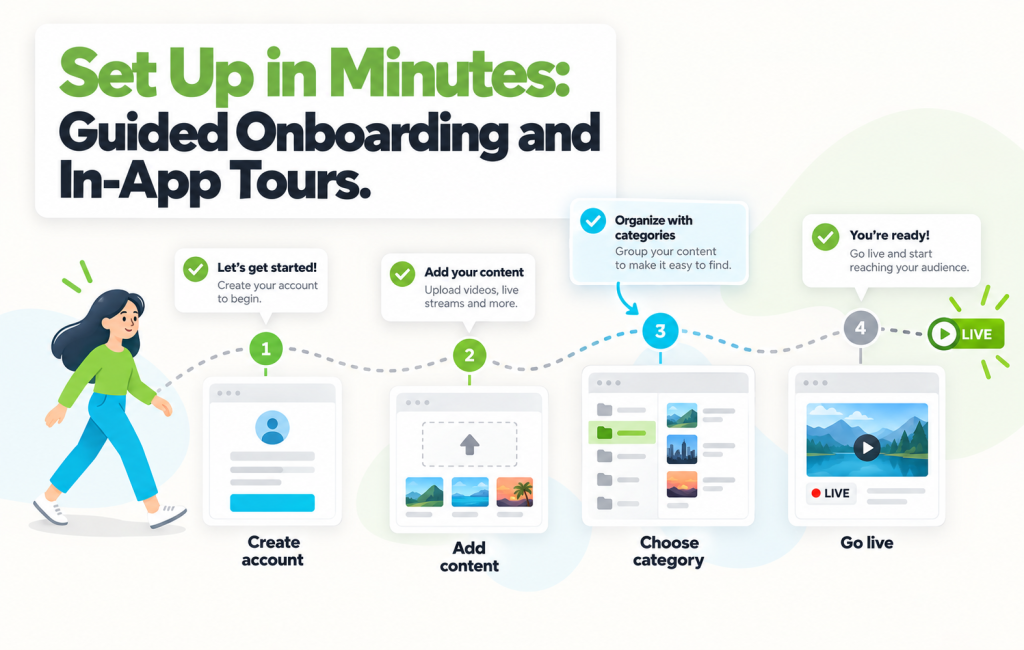
When you log in for the first time, you don’t get a blank dashboard and a wish of luck. You get a step-by-step start that walks you through the first thing every streaming platform needs: content you can show, in a category your audience can find, visible on your site. Then, when you’re ready to explore, interactive tours guide you through each major area.
The First-Run Checklist
New accounts land on a visible onboarding checklist that keeps the first-day setup focused:
- Add your first piece of content — upload a video, add from a link, or bring one in from YouTube or Dropbox
- Assign it to a category — so viewers can find it on your site and apps
- See it on your site — confirm the end-to-end flow works before you add anything else
Three steps. Nothing optional yet. Just the shortest path from empty account to a working streaming platform.

In-App Tours for Every Area
Once you’ve landed your first piece of content on the site, the dashboard opens up — and interactive tours are available on demand for each major area:
- Content — how videos, series, and live streams work together
- Analytics — where to find performance, engagement, and revenue data
- Branding — how to make the platform look like yours
- Platform — site menus, footer, Live TV, and the settings that shape how your audience experiences everything
- Tools — the technical pieces like embed codes, Player Studio, and integrations
Tours are opt-in. If you already know what you’re doing, you ignore them. If you’re new to a section, they walk you through it in context, without leaving the dashboard.
Who This Changes Things For
Guided onboarding doesn’t try to teach everything at once. It teaches the thing you need to know right now. Three groups feel this most:
- Free Trial users — get to “my first stream” in minutes instead of giving up at the empty dashboard
- Non-technical content owners — pastors, coaches, educators who shouldn’t need a developer to launch a platform
- New team members — joining an existing Bamboo Cloud account and learning the dashboard by exploring it, not by reading a wiki
“I was setting up our platform during our Monday team meeting. By the end of the meeting, we had a video live on the site. That didn’t used to be possible.” — Beta tester, independent faith publisher
How to Try It
If you’re a new Bamboo Cloud customer, the onboarding checklist appears the first time you log in to app.bamboo-cloud.com/admin. If you’re an existing customer, the in-app tours are available from the help menu in the top navigation.
See the new onboarding experience: app.bamboo-cloud.com/admin
Don’t have an account yet? Start your free trial today.